Install WireClaw on your ESP32 directly from the browser. No toolchain. No PlatformIO. Just plug in and click.
Supports ESP32-C6, ESP32-S3, and ESP32-C3 (4MB flash). Any compatible dev board with USB.
WebSerial requires a Chromium-based browser. Chrome 89+ or Edge 89+.
A USB-C or Micro-USB data cable. Make sure it's not charge-only.
From zero to a running AI agent in four steps.
Click "Install WireClaw" above. Select the serial port for your ESP32. The flash process takes about 2 minutes and includes the filesystem.
After flashing, the device reboots into AP mode. The LED pulsates light blue. Connect to the WireClaw-Setup WiFi network. A captive portal opens automatically - if it doesn't, open http://192.168.4.1 in your browser.
Enter your WiFi credentials, API key, and model. Note: "API Base URL" is only needed for local LLMs (Ollama, llama.cpp, etc.) - leave it blank when using OpenRouter.
Hit save. The device reboots, connects to your WiFi, and starts the dual-loop agent. You're done - talk to it via Telegram, serial, or NATS.
All configuration happens in the browser - no serial commands, no config files.
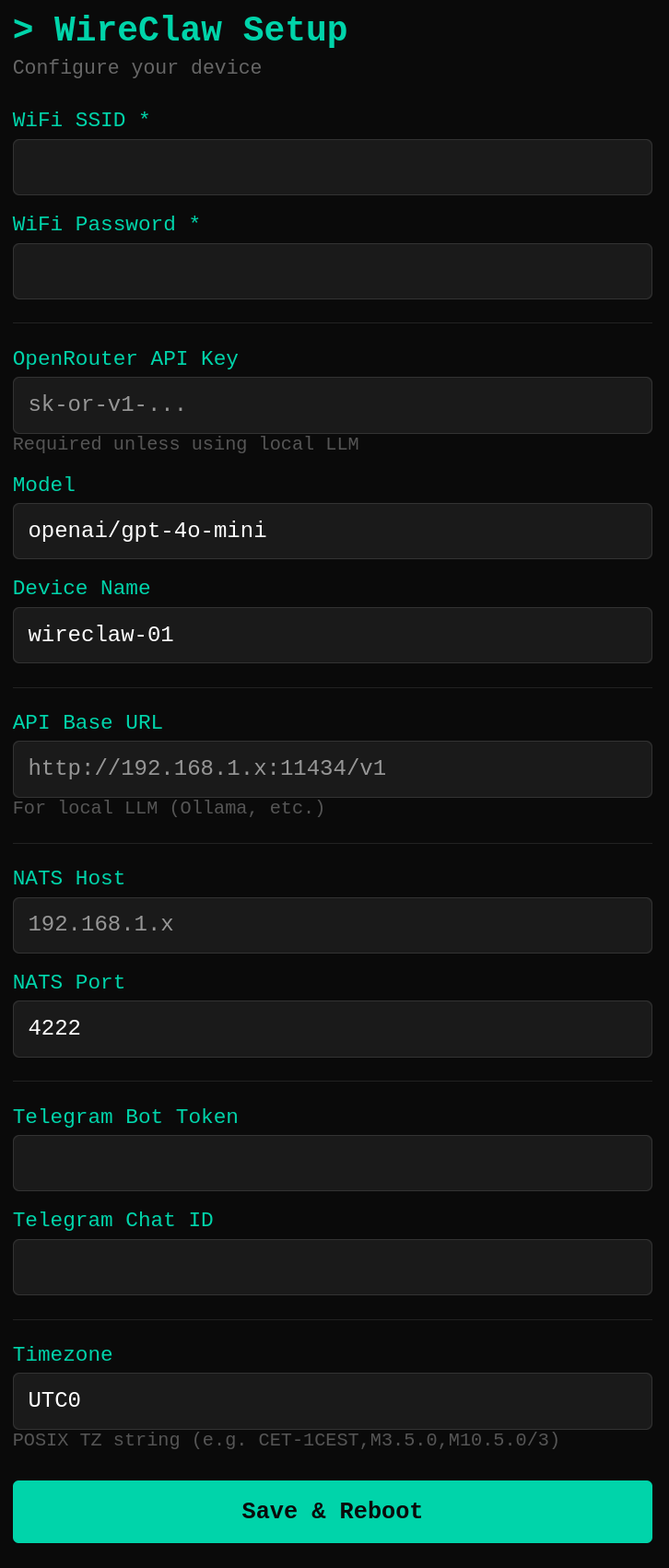
google/gemini-2.0-flash-001).CET-1CEST,M3.5.0,M10.5.0/3).WebSerial is required for flashing. Chromium-based browsers only.
If Chromium shows "No compatible devices found", it's likely installed as a snap, which blocks access to serial ports. Fix it by granting USB access:
sudo snap connect chromium:raw-usb
Then restart Chromium. You also need to be in the dialout group: sudo usermod -aG dialout $USER (log out and back in after).